Have you heard about ExitLag? The software that improves your performance and optimizes your online games across the world’s most popular titles.
Whether you’re competing in intense FPS battles, exploring massive MMORPG worlds, or fighting in MOBA arenas, ExitLag offers specialized connection optimization for over 3000 games.

What is ExitLag?
ExitLag is specialized network optimization software developed exclusively for online gaming. It’s important to note that ExitLag is NOT a VPN – while VPNs add encryption that increases latency, ExitLag uses proprietary multi-routing technology to reduce ping, eliminate packet loss, and stabilize your connection for competitive advantage.
Developed by gamers for gamers, ExitLag understands that every millisecond matters. Our technology finds the fastest and most stable routes between you and game servers, ensuring smooth, lag-free gameplay regardless of your location or internet provider quality.
How to Use ExitLag in Online Games
ExitLag offers some customization options. You can explore them in the settings menu, but the default settings are usually a good starting point.
1) Download and Install
The process is extremely simple:
- Step 1 – Access the official ExitLag website and download the application. There’s a free trial period for new users.
- Step 2 – Install and open the program. Log in with your account.

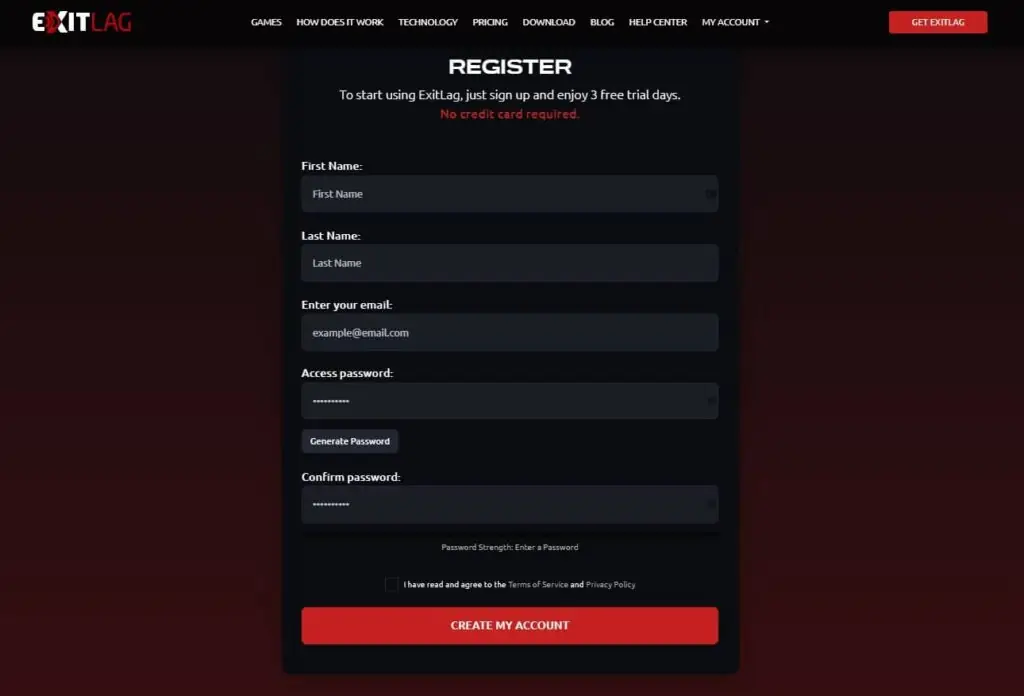
2) Create an Account (or Login)
- You’ll need an ExitLag account to use the service. You can either create a new account or log in if you already have one.
3) Open ExitLag and Find Your Game
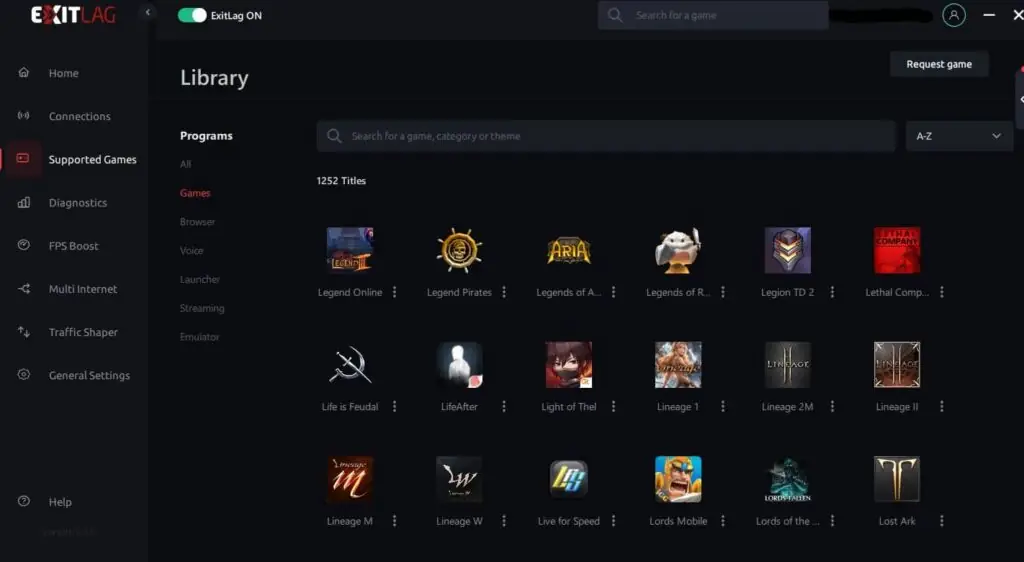
- Open the ExitLag app. You’ll see a list of supported games.
- Search for the game you want to improve ping for.
4) Select Server Region (Optional)
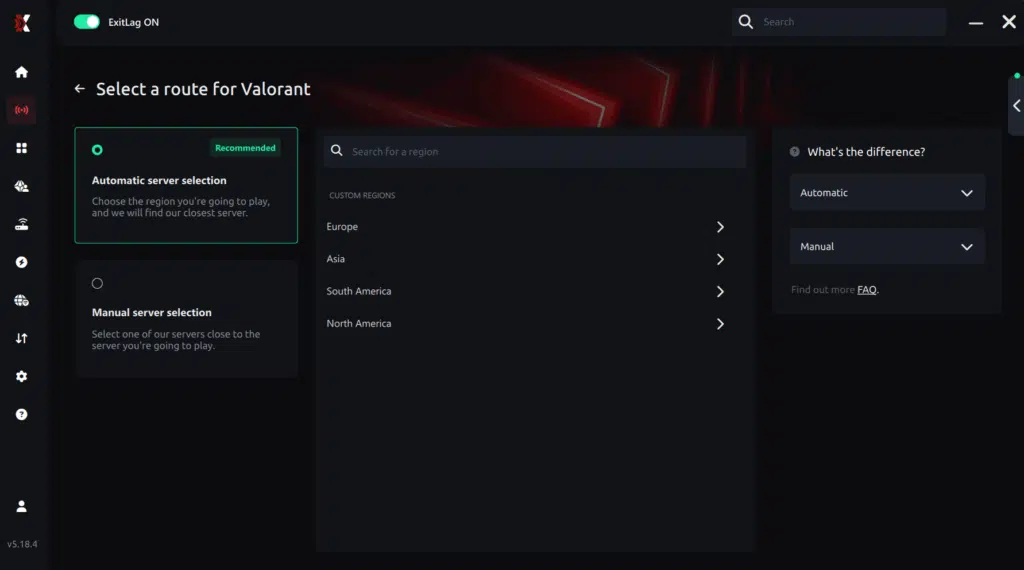
- In some cases, you might be able to choose the specific server region you want to connect to (e.g., US West Coast server for a game). If unsure, leave it on automatic.

5) Analyze and Apply Routes
- Click the “Analyze” button next to your chosen game. ExitLag will scan for optimal connection routes.
- Once the analysis is complete, click “Apply Routes” to activate ExitLag for that game.
Based on the ping test results, you can manually choose the server that showed the lowest latency or the one that best meets your specific gaming needs.
Manual route
If you prefer to have full control over your connection, you can manually choose the server based on the ping test results. Simply select the server that showed the lowest latency or the one that best meets your specific gaming needs, allowing complete customization of your experience.
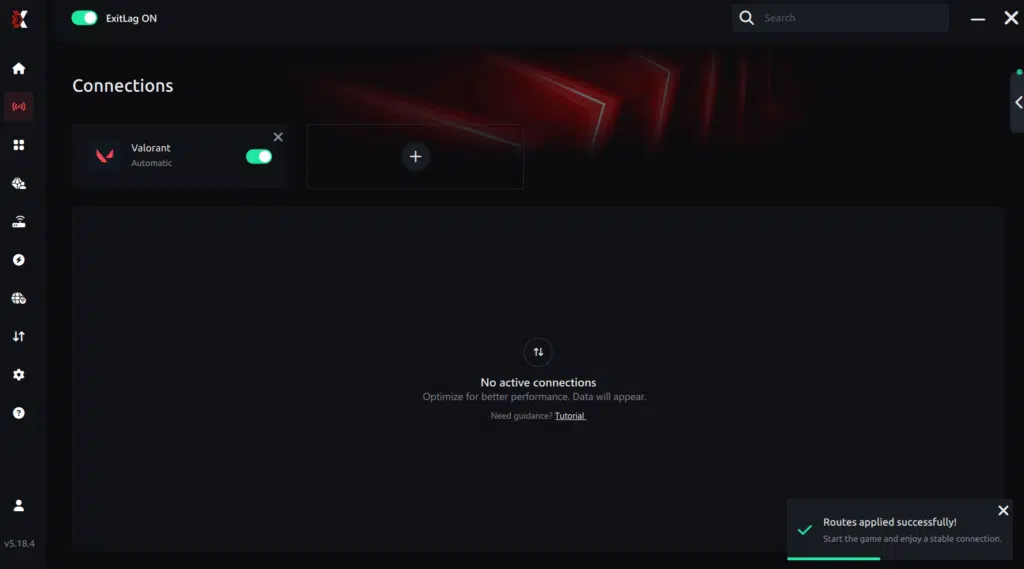
Click “Apply routes” or the play button. ExitLag will begin optimizing your connection automatically.

Wait a few seconds until optimization is complete. You’ll see ping indicators in the interface.
6) Launch Your Game
- ExitLag should take care of optimizing your connection in the background.
- Launch your game as usual and see if you experience a reduction in lag.
ExitLag runs in the background while you play, constantly adjusting routes to maintain the best possible performance.
Advanced ExitLag settings
- Automatic vs manual mode: For most players, automatic mode is ideal. ExitLag selects the best routes automatically. Advanced users can choose specific routes manually.
- Multiple routes: Enable this option for maximum stability – your data will travel through multiple routes simultaneously.
- Traffic Shaper: Automatically prioritizes critical game packets over other traffic types.
- Start with Windows: Configure ExitLag to open automatically when you turn on your PC.
How to use Ping for Games: step-by-step guide (
Checking your connection quality before entering a match has never been easier. Here’s how to use Ping for Games in just a few steps:
1. Open the ExitLag software on your PC
Ensure the application is installed and open. The feature is integrated into the platform and available for free to all users.
2. Access the Network Analyzer tool
Locate the Network Analyzer in the software menu. This is where you’ll find Ping for Games along with other connection analysis features.
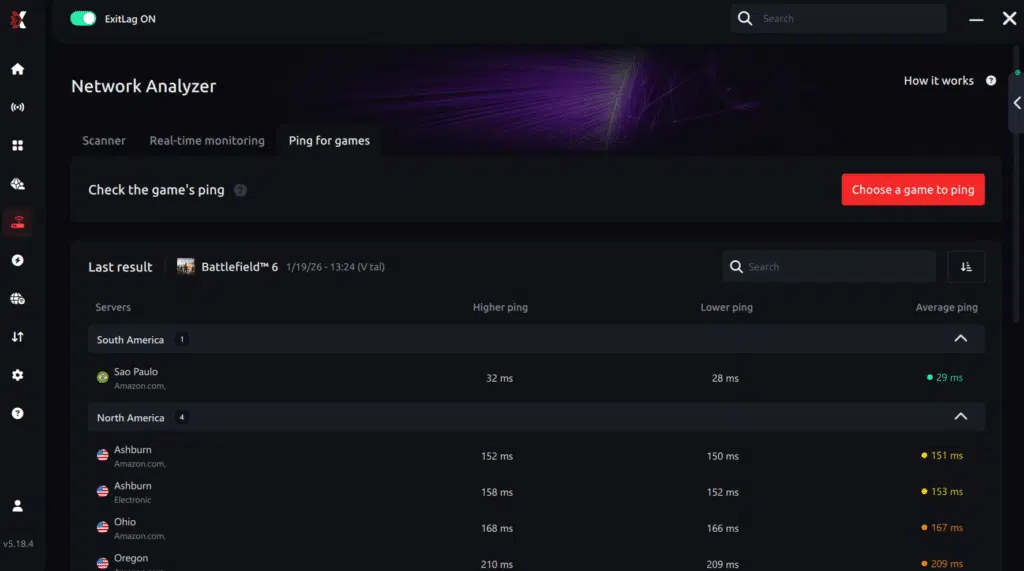
3. Select the game you want to test
The tool supports major online multiplayer games, including FPS, Battle Royales, MOBAs, MMORPGs, and more.
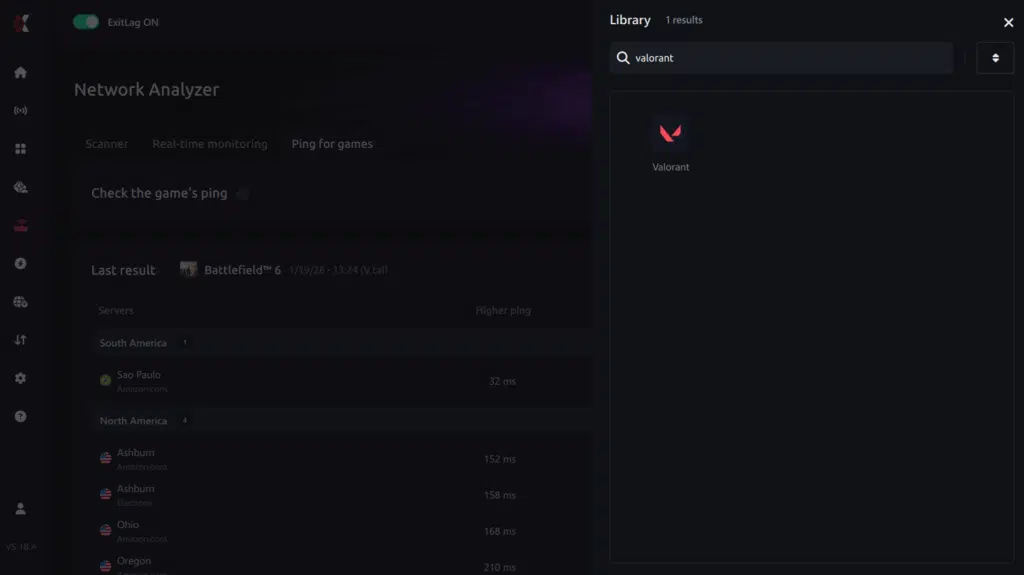
4. Choose the specific server
Select the exact server you want to test instead of a generic region. This ensures more accurate results for your match.
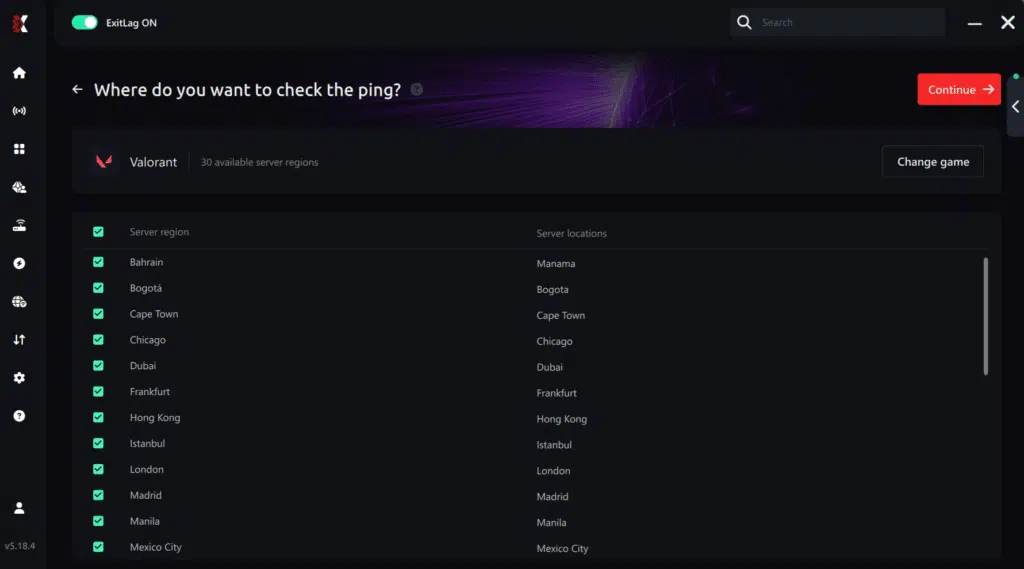
5. Start the ping test
With one click, the measurement is performed in real time between your device and the selected server, considering your current connection (cable or Wi-Fi).
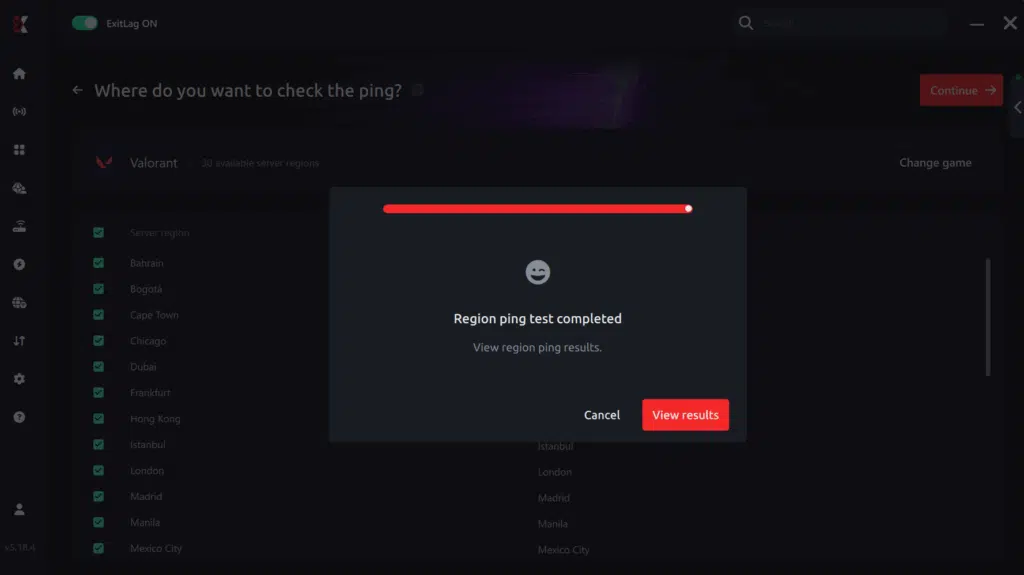
6. Analyze the results
Results appear in milliseconds (ms), automatically sorted from best to worst ping. You can also reorganize the view alphabetically if you prefer.
7. Choose the best server and play worry-free
With this information, simply select the server with the lowest latency!
Install ExitLag Mobile
ExitLag Mobile is available for free download on major app stores. Start optimizing your mobile games in minutes with our exclusive lag reduction technology.
How to Install ExitLag Mobile?
For Android (Google Play Store):
- Open the Google Play Store on your device
- Search for “ExitLag” or “ExitLag Mobile”
- Tap “Install”
- Wait for the download to complete (lightweight and fast app)
- Open the app and create your account
- 3-day free trial – no credit card required
For iOS (Apple App Store):
- Open the App Store on your iPhone or iPad
- Search for “ExitLag” or “ExitLag Mobile”
- Tap “Get”
- Confirm with Face ID, Touch ID, or password
- Wait for installation
- Open the app and create your account
- 3-day free trial – start immediately
Or use the QR Code:
- Scan the QR Code available at ExitLag Mobile
- You’ll be redirected directly to your device’s app store
How to lower ping in games?
High ping ruins your gaming experience with delayed commands, deaths behind cover, and unfair disadvantages. Here’s how to fix it.
Quick solutions to lower ping
1. Use ethernet cable
Switch from Wi-Fi to wired connection. Immediate 10-30ms improvement.
2. Close background apps
Stop downloads, streaming, and updates. Reduces ping 5-20ms.
3. Select nearest server
Choose closest regional server in game settings. Can drop ping from 150ms to 30ms.
4. Use ExitLag
ExitLag optimizes your connection route to game servers. ExitLag is NOT a VPN – it uses specialized gaming technology to reduce ping by 30-70%.
How it works:
- Finds fastest routes to servers
- Uses multiple paths simultaneously
- Eliminates packet loss and jitter
- Free trial available
5. Update network drivers
Download latest drivers from your network card manufacturer. Improves 5-15ms.
6. Configure router QoS
Prioritize gaming traffic in router settings. Reduces ping 10-25ms when network is busy.
7. Change DNS servers
Use Cloudflare (1.1.1.1) or Google (8.8.8.8). Faster initial connections.
Quick solutions to lower ping
What is ping?
Ping is the time (measured in milliseconds) it takes for your data to travel from your computer to the game server and back. It’s the most important measure of latency in online games.
How ping works:
- Your computer sends a small data packet to the server
- The server receives and responds immediately
- The total time of this round trip is your ping
Ping classification:
- 0-30ms: Excellent – Ideal for competitive gaming
- 30-50ms: Good – Suitable for most content
- 50-80ms: Acceptable – Noticeable lag in fast situations
- 80-120ms: Poor – Significant disadvantage
- 120ms+: Very poor – Game becomes frustrating
Why low ping matters:
- Instant response: Your commands execute immediately
- Competitive advantage: You see and react to enemies first
- Accurate hit registration: Your attacks register correctly
- Smooth movement: No teleporting or rubberbanding
What is lag?
Lag is the noticeable delay between you executing an action and seeing the result in the game. It’s mainly caused by high ping, but can also result from jitter and packet loss.
Types of lag:
Network lag
- Caused by high ping or unstable connection
- Symptoms: commands take time to respond, character teleports, disconnections
- Solution: ExitLag optimizes routes and reduces latency
Input lag
- Delay between pressing a button and action happening on screen
- Combination of network latency + game processing
- ExitLag reduces the network portion of this delay
Common lag symptoms:
- Delayed commands: You press a key but action takes seconds
- Rubberbanding: Character returns to previous position
- Enemy teleporting: Opponents appear in different places suddenly
- Death behind cover: You take cover but die anyway
- Skills not executing: Abilities don’t work when pressed
What is packet loss?
Packet loss occurs when data sent between your computer and the server doesn’t reach its destination. It’s like sending a letter that gets lost in the mail.
How packet loss affects games:
- Lost commands: Actions you executed simply don’t happen
- Teleporting: Your character “jumps” from one place to another
- Disconnections: Severe loss results in server disconnection
- Failed hit registration: Attacks don’t register even when hitting visually
- Stuttering: Game freezes momentarily while resyncing
Causes of packet loss:
- Poor routing: Congested routes drop packets
- Unstable Wi-Fi: Weak signal or interference causes losses
- Overloaded ISP: Provider with inadequate infrastructure
- Faulty hardware: Damaged cables, modem problems
Packet loss levels:
- 0-1%: Ideal – Imperceptible
- 1-2%: Acceptable – Small occasional problems
- 2-5%: Problematic – Compromised gameplay
- 5%+: Critical – Game becomes unplayable
What is jitter?
Jitter is the irregular variation of ping. While ping measures response time, jitter measures the consistency of that time.
Practical example:
- Without jitter: Stable ping at 50ms, 51ms, 50ms, 49ms
- With jitter: Ping varying between 40ms, 120ms, 65ms, 150ms
Why jitter is worse than high ping:
A high but stable ping (always 100ms) is more playable than low but variable ping (30-150ms). With stable ping, you can adapt to the delay. With jitter, each action has unpredictable response.
How jitter affects games:
- Impossible timing: You never know when commands will execute
- Broken combos: Ability sequences fail randomly
- Unpredictable dodging: Impossible to dodge when response varies
- Extreme frustration: Game becomes inconsistent and unfair
Causes of jitter:
- Network congestion: Packet priority varies constantly
- Unstable routing: Data passes through different routes at different times
- Wi-Fi: Interference causes signal variations
- Unstable ISP: Poorly configured infrastructure
Measuring jitter:
- 0-5ms: Excellent – Stable connection
- 5-15ms: Good – Small occasional variations
- 15-30ms: Acceptable – Problems in competitive content
- 30-50ms: Poor – Unpredictable timing
- 50ms+: Very poor – Impossible gameplay
How ExitLag solves each problem
ExitLag vs High Ping
The problem: High ping happens because your data travels long and inefficient routes to the server. Your internet provider chooses paths automatically, but they’re not always the fastest.
How ExitLag solves it:
- Real-time analysis: Continuously tests multiple possible routes
- Intelligent selection: Automatically chooses the fastest path
- Hop optimization: Reduces the number of “jumps” between routers
- Global servers: 600+ strategically positioned servers
Typical result:
- 30-70% ping reduction
- Ping of 150ms drops to 45-60ms
- Instant response to commands
- Real competitive advantage
ExitLag vs Lag
Lag is caused by high ping, jitter, and packet loss combined. It’s the general feeling that the game isn’t responding properly.
How ExitLag solves it:
- Reduces ping: Optimized routes decrease base latency
- Stabilizes connection: Eliminates variations that cause inconsistency
- Guarantees delivery: Multiple routes prevent data losses
- Prioritizes traffic: Game packets have absolute priority
Typical result:
- Elimination of 80-95% of noticeable lag
- Commands execute instantly
- Smooth movement without rubberbanding
- Fluid and responsive gameplay
ExitLag vs Packet Loss
The problem: Packet loss occurs when data gets lost in congested or unstable routes. Critical packets simply don’t reach their destination.
How ExitLag solves it:
- Multi-routing: Data travels through multiple routes simultaneously
- Redundancy: If one route loses packets, others compensate
- Stable routes: Automatically avoids problematic paths
- Constant monitoring: Detects and avoids loss points
Typical result:
- Elimination of 95-100% of packet loss
- Zero teleporting or stuttering
- All actions register correctly
- Reliable and consistent connection
ExitLag vs Jitter
The problem: Jitter happens when each packet travels slightly different routes or encounters variable conditions, resulting in inconsistent response times.
How ExitLag solves it:
- Optimized fixed routes: Maintains consistent paths
- Packet selection: Automatically chooses faster packets
- Intelligent buffering: Delivers data to the game uniformly
- Active stabilization: Compensates for variations before affecting gameplay
Typical result:
- Reduction of 90-100% of jitter
- Stable ping without variations
- Perfect and predictable timing
- Combos and dodges work consistently
ExitLag: Multi-Internet Technology
ExitLag’s proprietary technology works through:
Multiple simultaneous routes: Your data doesn’t travel through a single path. ExitLag sends information through 3-5 different routes at the same time. If one has problems, the others ensure perfect delivery.
- Intelligent packet selection: The system automatically chooses packets that arrived fastest, discarding delayed ones. You always receive data through the most efficient route at the moment.
- Continuous analysis: The software monitors the quality of each route in real-time, automatically adjusting as network conditions change.
- Game-specific optimization: Each title receives a customized profile based on its unique server communication needs.
Why ExitLag works better than VPNs
Common VPNs were developed for privacy, not gaming. They encrypt all traffic, adding extra processing that increases ping and worsens performance. The goal is to hide your online activity, not optimize speed.
ExitLag was developed exclusively for gaming. It uses specialized protocols without unnecessary encryption, focusing only on finding the fastest and most stable routes. The result is reduced ping and optimized connection.
Why this matters:
- VPNs add 20-100ms of extra latency
- ExitLag reduces 30-70% of existing latency
- VPNs use a single route (usually congested)
- ExitLag uses multiple simultaneous routes with automatic failover
- VPNs prioritize encryption over speed
- ExitLag prioritizes speed and stability above all
Main game categories on ExitLag
FPS games (First-Person Shooters)
ExitLag is essential for FPS titles where milliseconds determine victory. Our optimization reduces ping, stabilizes hit registration, and eliminates the micro-stuttering that costs kills.
Popular FPS games:
- Valorant: Dominate ranked with stable ping and perfect hit registration
- Counter-Strike 2: Competitive CS2 demands the lowest possible latency
- Call of Duty (all versions): Reduce lag and eliminate packet loss in multiplayer
- Apex Legends: Fast-paced battle royale requires consistent connection
- Rainbow Six Siege: Tactical gameplay depends on reliable server communication
- Overwatch 2: Hero abilities and team coordination need stable latency
MOBA games (Multiplayer Online Battle Arena)
MOBA games severely punish lag and jitter. ExitLag ensures your skills execute precisely when intended, your movements are responsive, and you maintain competitive advantage.
Popular MOBA games:
- League of Legends: Climb ranks with optimized ping to Riot servers
- Dota 2: Professional-level performance requires stable connection
- Mobile Legends: Dominate mobile MOBA with reduced latency
- Arena of Valor: Competitive mobile gaming optimized
MMORPG games (Massively Multiplayer Online RPG)
MMORPGs demand stable connections for raids, PvP, and massive events. ExitLag eliminates the lag and disconnections that cost you progress.
Popular MMORPG games:
- World of Warcraft: Raid and PvP without lag or disconnections
- Lineage 2: Classic MMORPG performance optimized
- Lost Ark: Action-packed gameplay requires responsive connection
- Throne and Liberty: Next-generation MMORPG fully supported
- Where Winds Meet: Martial arts action with stable ping
- Path of Exile: Fast-paced ARPG combat optimized
- Albion Online: Full-loot PvP demands perfect connection
Battle Royale games
Battle Royale titles combine FPS precision with survival strategy. ExitLag ensures you maintain advantage throughout long matches.
Popular Battle Royale games:
- Fortnite: Build, edit, and shoot with minimal lag
- PUBG: Competitive BR performance optimized
- Free Fire: Mobile BR with reduced latency
- Apex Legends: Fast movement and abilities need stable connection
Fighting games
Fighting games are unforgiving of connection issues. Frame-perfect inputs and combos demand the absolute lowest latency and zero jitter.
Popular fighting games:
- Street Fighter 6: Competitive fighting optimized
- Tekken 8: Online ranked matches with stable connection
- Mortal Kombat: Execute combos without lag
- Guilty Gear Strive: Rollback netcode enhanced with ExitLag
Sports & Racing games
Sports and racing titles require precise timing and real-time multiplayer synchronization.
Popular sports games:
- EA Sports FC: FIFA successor with optimized ping
- Rocket League: Car soccer demands zero lag
- NBA 2K: Online basketball with stable connection
- Gran Turismo: Racing simulation optimized
ExitLag is The Best Choice
Yes! ExitLag isn’t a generic solution adapted for gaming, it’s technology developed specifically by gamers:
| Game-specific optimization | Each title receives customized routing profiles based on its unique server infrastructure and network requirements |
| Global server network | 600+ servers worldwide ensure you always have optimized paths, regardless of your location or the game’s server regions |
| Multi-path redundancy | If your primary route experiences problems, backup paths maintain your connection seamlessly |
| Zero packet loss | Critical for competitive gaming where every data packet matters |
| Works with any ISP | Whether your internet provider has excellent or terrible routing, ExitLag finds better paths |
Benefits across all game genres
Regardless of which games you play, ExitLag delivers consistent benefits:
Lower ping: Typical reductions of 30-70% in latency Stable connection: Eliminate jitter and ping spikes No packet loss: Redundant routing ensures zero data loss Better hit registration: Stable latency improves accuracy Smoother gameplay: Eliminate micro-stuttering from network issues Competitive advantage: React faster and execute precisely Works globally: Optimized for players worldwide
Pricing and plans
ExitLag offers flexible plans designed for every gaming budget:
- Free trial: Test all features without a credit card Monthly plans: Pay as you go with no commitment Annual plans: Best value for serious gamers
- Visit our pricing page for current options and special offers.
Transform your gaming experience across 3000+ titles. Start your ExitLag free trial now and feel the difference immediately!
Real results from real gamers
ExitLag serves millions of players globally with proven results:
Average improvements:
| Ping reduction | 30-70% lower latency |
| Packet loss | 95-100% elimination |
| Professional use | Competitive teams and esports organizations trust ExitLag for tournament-level performance |
| Connection stability | Dramatic improvement in consistency |
Does ExitLag work for my game?
With 3000+ supported titles and continuous expansion, ExitLag likely supports your game. Check our complete games list or search within the application.
Will ExitLag make my old PC run games better?
ExitLag optimizes network connection, not hardware performance. It won’t increase your FPS from hardware limitations, but will eliminate stuttering and lag caused by the network.
Is ExitLag legal and safe?
Completely legal and safe. ExitLag is legitimate software used by millions, including professional players. It doesn’t modify game files or violate any terms of service.
Start optimizing your games today
Don’t let poor network routing limit your gaming potential. Whether you’re climbing ranked ladders, competing in tournaments, or simply want smooth gameplay, ExitLag provides the competitive advantage you need.
Try ExitLag free today without a credit card. Experience reduced ping, eliminated packet loss, and stable connections within minutes. Join millions of gamers who’ve already discovered the difference optimized routing makes.
For detailed guides on specific games, optimization tips, and gaming news, explore our blog for comprehensive resources.
Transform your gaming experience across 3000+ titles. Start your free ExitLag trial now and feel the difference immediately!