Learning how to create custom maps in Fortnite is a question many players ask when they want to turn their own ideas into playable experiences. With Fortnite creative, players can move beyond standard matches and design arenas, challenges, environments, and gameplay systems that reflect their own creativity. A custom map can be simple or highly complex, depending on the tools and features used.
For players interested in Fortnite creative, the process combines building, planning, testing, and experimentation. Instead of simply entering a predefined match, creators can decide how an experience should look, how players should interact with it, and what objectives they should complete. This makes custom map creation an appealing way to explore game design while remaining inside the Fortnite ecosystem.
What is Fortnite creative?
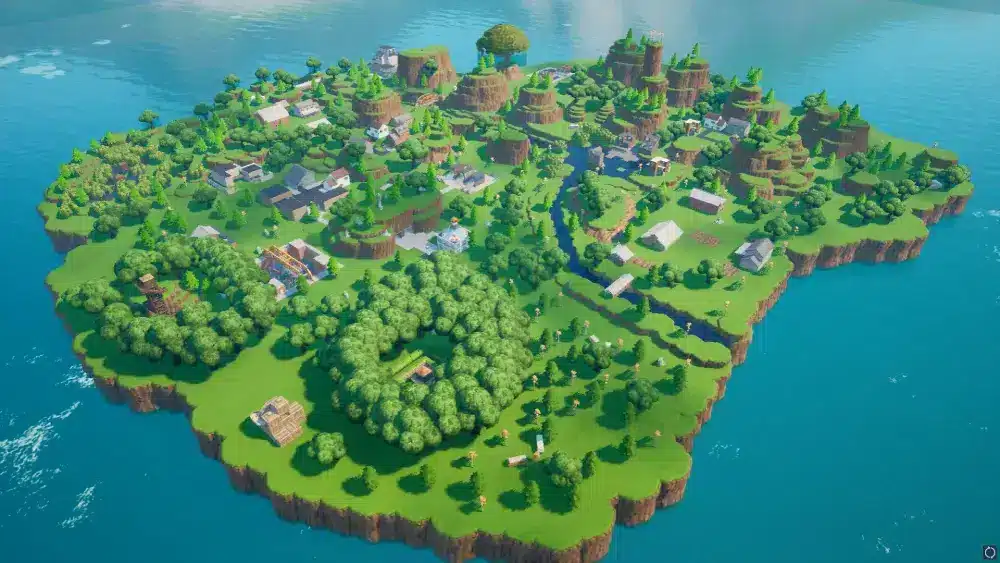
Fortnite creative is a Fortnite creation environment that allows players to design, build, customize, and test their own islands and gameplay experiences using a range of building tools, prefabs, devices, and other creation features. Depending on the project, creators can also use Unreal Editor for Fortnite, or UEFN, to access more advanced design and scripting capabilities.
For anyone asking how to create custom maps in Fortnite, understanding the difference between playing and creating is the best place to begin. Fortnite Creative changes the player’s role from someone who experiences a game to someone who helps define the experience itself. That shift requires planning, experimentation, and an understanding of how individual design decisions affect the final gameplay.
What Is Fortnite Creative and Why Create Custom Maps?
Before starting a new project, it is important to understand what makes custom map creation different from a standard Fortnite match. A conventional match provides an established environment, rules, objectives, and gameplay structure. A creator, however, can influence many of those elements when designing an island.
This flexibility is one of the main reasons custom maps have become an important part of the Fortnite ecosystem. A well-designed island can focus on competition, exploration, puzzles, parkour, combat, social interaction, or completely different concepts.
Playing Fortnite Versus Creating Experiences
Playing Fortnite usually places the player inside a predefined experience. The objective may be to survive, eliminate opponents, complete challenges, or achieve another goal established by the game mode.
Creating a map changes that relationship. The creator must think about the experience from the perspective of everyone who will eventually play it.
That means asking questions such as:
- What should players understand when they first enter the island?
- Where should the main action take place?
- What should encourage players to continue?
- How difficult should each challenge be?
- What happens if players fail?
- How can the map remain interesting after the first playthrough?
These questions demonstrate why map creation is more than simply placing buildings or objects. A strong Fortnite map needs a purpose, structure, and clear gameplay flow.
Creators can begin with a simple concept and gradually add complexity. For example, a basic arena might start with two teams and a defined objective. Later, the creator could introduce devices, score systems, environmental obstacles, or special mechanics.
Why Custom Maps Are Popular
Custom maps provide an opportunity to experiment with ideas that would not necessarily fit into a traditional match. A creator can design a compact challenge, a large exploration environment, or an experience built around a particular gameplay mechanic.
There is also a social element. Maps become more valuable when other players can experience them, provide feedback, and return for additional sessions.
This means that successful creation is not only about technical construction. It is also about understanding what makes an experience enjoyable.
A map can have impressive visuals and still fail to retain players if the objective is confusing. Likewise, a visually simple map can be highly successful if its gameplay loop is clear and engaging.
Creativity, Recognition, and Game Design Skills
Creating islands can also help players develop skills that are useful beyond a single project. Designing environments requires spatial awareness, while gameplay systems require logical thinking and testing.
Creators may also develop an understanding of pacing, player behavior, level design, and interactive storytelling.
Community recognition can become another motivation. Fortnite has a large creator ecosystem, and distinctive experiences can attract attention when they provide something players genuinely want to experience.
For that reason, learning how to create custom maps in Fortnite can be both a recreational activity and a practical introduction to concepts associated with game development.
Getting Started With Fortnite Creative
The first practical step is accessing the creative environment and understanding how its interface works. New creators should resist the temptation to immediately build a huge project. Starting with a manageable island makes it easier to understand the available tools and identify problems during testing.
The goal at this stage is not to create the most ambitious map possible. Instead, it is to establish a reliable foundation.
How to Access the Creative Environment
The basic process begins by launching Fortnite on the platform where the player has access to the required creation features. From there, the player can enter the creative environment and access available islands.
A simple workflow looks like this:
- Launch Fortnite and enter the appropriate creative environment.
- Access the available creation area or island selection.
- Choose an empty island or an appropriate template.
- Familiarize yourself with movement and building controls.
- Open the available inventory and creation tools.
- Place a few objects and devices to understand how they behave.
- Test the island before adding more complexity.
Starting with a blank island gives creators maximum freedom. Templates, meanwhile, can be useful when a player wants to understand how certain types of experiences are structured.
Understanding Creation Slots and the Interface
Creation slots allow projects to remain organized. Instead of rebuilding the same environment every time, creators can maintain different ideas and experiments.
The interface also provides access to objects, prefabs, devices, and other resources. Learning where these elements are located saves time later.
New creators should spend time experimenting with basic actions such as placing, moving, rotating, copying, and removing objects.
That early experimentation is important because map design is often iterative. A structure that looks correct from one angle may block movement from another. A device may also behave differently than expected once players interact with it.
Understanding the interface therefore becomes part of the creative process itself.
Planning the First Map Before Building
One of the easiest mistakes is beginning construction without deciding what the map is supposed to accomplish.
Before placing hundreds of objects, define a simple concept.
For example, a first project could be a small competitive arena with one central objective. Another option could be a short obstacle course with several checkpoints.
A useful planning document can include:
- The main objective.
- The intended number of players.
- The starting location.
- The main gameplay area.
- The win condition.
- The approximate length of a match.
- The main challenge.
- The type of feedback players should receive.
This approach keeps the project focused. It also makes later testing much easier because the creator knows what the map is supposed to achieve.
Fortnite Creative Tools for Custom Map Design
Once the basic environment is understood, the next step is learning how different creation tools contribute to the overall experience. The available features allow creators to build environments manually while also using prefabricated elements and interactive devices.
The best approach is usually not to use every available tool. Instead, creators should select tools that support the central idea of the map.
Manual Building and Prefabricated Elements
Manual construction provides direct control over individual structures. Walls, floors, platforms, props, and other elements can be positioned to create a specific layout.
This approach is useful when a creator needs a particular shape or wants to control the appearance of an environment closely.
Prefabricated elements can speed up construction. Instead of building every component individually, creators can use ready-made structures and modify them as necessary.
The choice between the two depends on the project.
Manual building is generally useful when precision matters. Prefabs are valuable when speed and consistency matter.
Combining both approaches can also be effective. A creator might use a prefab as the foundation of a building and then modify its surrounding environment manually.
Cloning, Resizing, and Repetition
Repeated structures can consume a significant amount of creation time if they are rebuilt individually.
Cloning allows creators to duplicate objects or groups of objects. This is especially useful for arenas, corridors, platforms, obstacle courses, and symmetrical layouts.
Resizing can also help adapt an object to the intended environment. However, creators should always test modified elements because changing the scale or position of an object can affect how players interact with the surrounding space.
These tools are most effective when used alongside a clear layout plan.
Devices and Basic Gameplay Logic
Devices are particularly important because they can transform a static environment into an interactive experience.
A building by itself is only an environment. A building combined with triggers, objectives, scoring systems, or other interactions can become part of a gameplay loop.
Basic logic can be used to:
- Trigger events.
- Activate or deactivate gameplay elements.
- Track player progress.
- Establish objectives.
- Create rewards.
- Control parts of the environment.
- Provide feedback to players.
This is where map design starts becoming game design. The creator is no longer only deciding where objects should be placed. They are determining how players should interact with those objects.
Designing a Fortnite Map Around Player Experience
A technically functional map is not automatically a good map. Players need to understand what they are supposed to do, where they should go, and why they should continue playing.
That is why the player experience should guide the design from the beginning.
Creating a Clear Gameplay Loop
A gameplay loop is the repeated sequence of actions that forms the core of an experience.
For example, a simple competitive map might use a loop such as:
Enter the arena → find the objective → compete for control → score points → return to the next round.
An obstacle map could use:
Start → navigate obstacles → reach checkpoint → overcome the next challenge → finish.
The exact structure can vary, but the important principle is consistency. Players should understand the relationship between their actions and the outcome.
Balancing Difficulty and Progression
Difficulty should increase in a controlled way.
If the first challenge is already extremely difficult, new players may leave before discovering what makes the map interesting. On the other hand, if every challenge is trivial, experienced players may lose interest.
A useful progression can introduce one mechanic at a time.
First, teach the mechanic. Then, allow the player to practice it. Finally, combine it with another challenge.
This approach makes the map easier to understand while still providing room for mastery.
Using Visual Design to Guide Players
Visual design is not only about making an island attractive. It can also communicate information.
Distinctive structures can identify important areas. Open spaces can indicate where players should move. Lighting, architecture, and environmental landmarks can reinforce navigation.
A creator should test whether a player can understand the environment without receiving constant instructions.
If players repeatedly become lost, the problem may not be the player. It may indicate that the map needs stronger visual guidance.
UEFN and Advanced Fortnite Creative Development
For creators who want more control, Unreal Editor for Fortnite expands the possibilities available through the standard creative workflow.
UEFN is designed for more advanced projects and provides tools associated with professional game development. It can support detailed environments, more complex gameplay systems, and scripting through Verse.
Creators interested in advanced development can consult the official Epic Games documentation for Fortnite creation tools and UEFN resources. Epic Games Fortnite Creative documentation.
Standard Creative Versus UEFN
The two approaches are related, but they serve different levels of creation.
| Feature | Fortnite Creative | UEFN |
| Accessibility | Designed for easier entry | More advanced workflow |
| Building | Built-in creation tools | Expanded editing capabilities |
| Customization | Strong within available tools | Greater control over environments and systems |
| Gameplay logic | Devices and available systems | Advanced logic and Verse scripting |
| Visual control | Flexible | More detailed |
| Learning curve | Lower | Higher |
| Best suited for | Beginners and rapid prototyping | Advanced and ambitious projects |
This does not mean creators must immediately move to UEFN. Standard Creative can be enough for many projects.
The best choice depends on the intended result.
When UEFN Makes Sense
UEFN becomes particularly valuable when the creator wants to develop systems that require more detailed control than the standard workflow provides.
It can be useful for creators who want to experiment with advanced environments, custom gameplay logic, or more sophisticated projects.
However, the additional flexibility also means that creators need to invest more time in learning the tools.
Someone completely new to map creation may benefit from understanding the fundamentals first.
Learning Verse and Advanced Logic
Advanced UEFN projects can involve Verse, a programming language used to create custom gameplay behavior.
Programming is not necessary for every custom map. A creator can build many experiences using available devices and systems.
However, Verse becomes valuable when a project requires behavior that cannot be achieved easily through standard configuration.
The important point is to learn programming because the project needs it, rather than adding complexity simply because the option exists.
Testing and Improving Your Custom Map
Testing is one of the most important stages of map development. A creator who only builds without repeatedly playing the island may miss problems that are obvious from a player’s perspective.
Testing should happen throughout development, not only when the map appears finished.
Testing Movement and Gameplay
Start by checking the basics.
Can players move through the environment comfortably? Are there areas where they become stuck? Are objectives easy to identify? Does the gameplay loop actually work?
Creators should also test unexpected behavior.
Players rarely interact with a map exactly as the designer intended. They may find shortcuts, reach unintended areas, ignore instructions, or exploit mechanics.
These discoveries are useful because they reveal how resilient the map is.
Testing With Other Players
Solo testing provides valuable information, but multiplayer testing can reveal additional issues.
Different players may interpret objectives differently. Some may move faster, while others may explore every corner of the environment.
A small group of testers can therefore provide feedback that the creator cannot obtain alone.
Useful questions include:
- Did you immediately understand the objective?
- Where did you become confused?
- Was anything frustrating?
- Was the difficulty appropriate?
- Did the match feel too short or too long?
- Which part was the most enjoyable?
- Would you play the map again?
The answers can guide revisions more effectively than simply asking whether players “liked” the map.
Iteration and Performance
Map creation is an iterative process.
A creator builds something, tests it, identifies a problem, changes it, and tests again.
This cycle should continue until the experience is coherent and stable.
Performance should also be considered. Excessive complexity can make an environment harder to manage and potentially affect the experience.
A clean design is often better than an unnecessarily complicated one.
Fortnite Account Requirements and Publishing Preparation
Once a map is functional, creators can begin preparing it for wider distribution. A Fortnite account is an important part of accessing and managing the Fortnite experience, while publishing also requires creators to follow the applicable rules and requirements.
Creators should verify that their account is in good standing and that their project complies with the platform’s requirements before attempting to distribute it.
Preparing a Map for Publication
Before submitting a project, review the entire experience from beginning to end.
Check the starting area, objectives, player flow, gameplay mechanics, and ending conditions.
A final checklist should include:
- Confirm that the map starts correctly.
- Test the main objective.
- Check player spawning and movement.
- Verify interactive devices.
- Look for unintended shortcuts.
- Remove unnecessary objects.
- Test multiplayer behavior.
- Review the presentation of the island.
- Confirm that the content follows applicable rules.
- Make final corrections before submission.
This process reduces the likelihood that preventable problems will undermine the final experience.
Content Rules and Ownership
Creators should also consider intellectual property and platform policies.
Using another creator’s work without appropriate authorization can create problems, even if the borrowed content appears useful for the map.
A strong project should therefore be built around content that the creator is allowed to use.
The same principle applies to names, artwork, branding, music, and other protected materials.
For creators building a public-facing experience, compliance should be considered part of the design process rather than an afterthought.
Understanding the Role of Epic Games Fortnite
The relationship between creators and Epic Games Fortnite tools is important because the platform determines the systems, policies, and publishing environment available to creators.
The creator controls the concept and execution of the island, but the project still exists within the broader Fortnite ecosystem.
That means creators should stay aware of applicable platform requirements and make sure their projects remain compatible with the publishing process.
Publishing and Sharing a Fortnite Map
Publishing is the stage where a private creation can become a community experience. However, creators should not treat publishing as the first moment when the map is evaluated.
A project should already be stable, understandable, and enjoyable before it is submitted.
Preparing the Island for Release
The final version should represent a polished experience rather than an unfinished prototype.
Creators should revisit the opening moments because first impressions matter. A player should quickly understand what type of experience they have entered.
The map’s central idea should also remain visible throughout the experience.
If a creator initially designed a competitive arena but later added unrelated mechanics, the final project may feel unfocused.
Removing unnecessary features can sometimes improve a map more than adding new ones.
Sharing With the Community
Once the publishing process is complete and the island is available for sharing, creators can promote the experience through communities where Fortnite players gather.
Useful promotional approaches can include:
- Sharing gameplay footage.
- Demonstrating the main mechanic.
- Showing the map’s most distinctive area.
- Explaining the objective clearly.
- Asking players for feedback.
- Updating the experience when meaningful improvements are available.
Promotion should communicate why the map is worth playing.
A generic announcement is less informative than a short demonstration that shows what makes the island different.
Building a Creator Identity
Over time, creators can also develop a recognizable style.
Some may specialize in competitive arenas. Others may focus on horror experiences, parkour, puzzles, social maps, or experimental mechanics.
A consistent creative identity can help players understand what to expect from future projects.
The most important element, however, remains quality. A recognizable name is useful, but players return when the experiences consistently deliver something enjoyable.
Improving Multiplayer Testing and Connection Stability
Testing a multiplayer map can be more demanding than building it alone. Several players interacting with the same environment can expose issues that do not appear during solo testing.
Stable connectivity can make the testing process more consistent, especially when creators are evaluating timing-sensitive mechanics or coordinating collaborative sessions.
Why Connection Quality Matters During Testing
Latency can influence how multiplayer interactions feel.
When a creator is testing competitive mechanics, timing can become particularly important. Delayed interactions may make it harder to determine whether an issue comes from the map itself or from network conditions.
For that reason, creators should test under realistic conditions whenever possible.
A stable connection can help provide a clearer picture of how the experience behaves during multiplayer sessions.
Collaborative Creation and Feedback
Collaboration also benefits from reliable communication and gameplay conditions.
When multiple people are reviewing an island, they need to be able to focus on design decisions instead of constantly dealing with interruptions.
However, connection optimization should remain only one part of the workflow.
The core priorities are still:
- Define the map’s objective.
- Build the basic environment.
- Implement the gameplay loop.
- Test the experience.
- Collect feedback.
- Fix problems.
- Repeat the process.
- Prepare the final version for publishing.
This workflow keeps technical considerations in their proper place while ensuring that the creative goal remains central.
Building Better Custom Maps With Fortnite Creative
The most effective way to improve at map creation is to build repeatedly. Each project reveals new lessons about player behavior, level design, pacing, and technical implementation.
Creators should not expect the first island to be perfect.
Instead, the first project should establish a foundation for the next one.
Start Small and Expand Gradually
A small project is easier to finish than a huge one.
For a first island, consider limiting the scope to one central mechanic and a compact environment.
Once that system works, expand it carefully.
This approach prevents creators from spending hours building an enormous environment before discovering that the central gameplay idea does not work.
Prioritize Function Before Decoration
Visual polish matters, but it should not come before functionality.
A beautifully decorated map with unclear objectives is still difficult to enjoy.
A more effective order is:
- Establish the objective.
- Build the playable space.
- Implement the core mechanics.
- Test the experience.
- Fix problems.
- Improve navigation.
- Add visual polish.
- Test again.
This order ensures that decoration supports gameplay instead of hiding structural problems.
Use Feedback as a Design Tool
Creators naturally become attached to their own ideas. That can make it difficult to recognize problems.
External feedback helps reveal issues that are difficult to see from the creator’s perspective.
If several testers independently become confused in the same location, that is strong evidence that the area needs improvement.
Likewise, if players consistently enjoy one mechanic more than the others, the creator may have discovered an opportunity to expand that concept.
Feedback should not mean accepting every suggestion. Instead, it should help identify recurring patterns.
Continue Experimenting
The strength of creative map development is the ability to experiment.
A creator can test a new layout, change the rules, rebuild an objective, or try a different approach to player progression.
Not every experiment will succeed.
That is normal.
Failed experiments still provide information about what does and does not work.
Over time, this process builds practical design knowledge and makes future projects easier to plan.
Taking the Next Step With Fortnite Creative
Fortnite Creative provides an accessible foundation for building islands, experimenting with gameplay, and sharing original ideas, while UEFN offers additional possibilities for creators who want to develop more advanced experiences. In this context, ExitLag can be considered as a connection-optimization tool for players who want to reduce the impact of routing-related latency while testing or playing Fortnite.
Frequently Asked Questions About Fortnite Creative
How do I start creating maps in Fortnite?
To start creating maps in Fortnite creative, enter Fortnite’s creative environment, choose an available island or template, and begin experimenting with the building tools, prefabs, and devices. Starting with a small project makes it easier to understand the interface and test your first gameplay ideas.
What tools can I use to create a Fortnite map?
Creators can use building tools, prefabs, cloning, resizing, and interactive devices to design a Fortnite map. For more advanced projects, UEFN provides additional editing capabilities, custom gameplay logic, and Verse scripting.
Do I need UEFN to create custom maps in Fortnite?
No. Standard Fortnite creative provides enough tools to create many different types of custom islands without programming. UEFN is mainly useful for creators who want more advanced environmental control, gameplay systems, visual detail, or scripting capabilities.
Can I publish a map created in Fortnite Creative?
Creators can prepare their island for publishing after testing the gameplay, checking stability, reviewing content requirements, and completing the applicable publishing process. A Fortnite account is part of the overall Fortnite ecosystem used to access and manage the experience.
Is programming required to create a Fortnite map?
Programming is not required for basic map creation. Standard Creative tools and devices can support many gameplay ideas. However, creators working with UEFN may benefit from learning Verse when they need custom gameplay behavior that cannot be achieved through standard devices.
Got questions or want to connect with other players? Join the conversation at the ExitLag Forum!